
About Delegation
Delegated Filers are integral to the delegation and filing authority processes, allowing filers to manage who can file and access their EDGAR account.
While RDG Filings does not need to be a filer‘s account administrator or technical administrator, delegation is still required in order to provide authorization for us to submit filings to the SEC on your behalf.
Video Walkthrough: Delegation in EDGAR Next
Delegation in EDGAR Next
Account Administrators can assign Delegated Filers via the Delegation tools in EDGAR Next. Here‘s how:
1. Login to the Filer Management site, go to My Accounts.
2. Select the filing entity.
3. Select Manage Delegations and User Groups.
4. Select Add Delegation.
Only delegate to a filer with which you have an existing agreement to file on EDGAR on your behalf.
5. Type the delegated entity‘s name or CIK.
The CIK for RDG Filings is 0001437749.
6. Review the delegated entity information, then click Delegate.
7. Confirm the delegation.
- If the filer’s account administrator accepts the invitation, the filer will become your delegated entity and will be able to make filings on your EDGAR account.
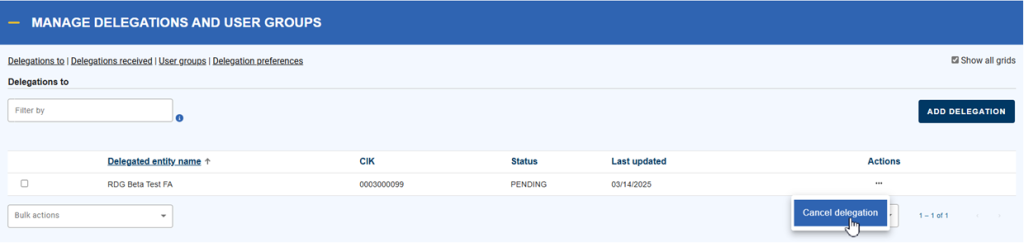
- You may cancel the delegation at any time by selecting Cancel Delegation. The delegated entity does not need to accept the cancellation for it to be effective.

EDGAR Next Roles
EDGAR Next requires filers to assign specific roles to individuals or entities involved in the filing process. These roles are:
- Account Administrator: Manages filer account settings and oversees user access. This role does not manage individual user API tokens, this can only be done by the individual user or administrator.
- User: Authorized to submit filings on behalf of the filer.
- Technical Administrator: Manages the filer API Token. This role does not manage individual user API tokens, this can only be done by the individual user or administrator.
- Delegated Filer: Authorized to file on behalf of the filer.
If you would like RDG to manage your filer API token, then you must add RDG as a Technical Administrator. Delegated Filers cannot manage the filer API Token.
While RDG does not need to be an account administrator for you or your company to continue using ThunderDome®, RDG can be added as a backup account administrator if needed.
NOTE: Adding RDG as an account administrator does not replace delegating RDG to file on your behalf. Delegation is still a required step.